Ninja Shuriken: Throw & Slice
- 4.0
- Rating
- 1.00M
- Installs
- Free
- Price
 Analysis by App-foxy
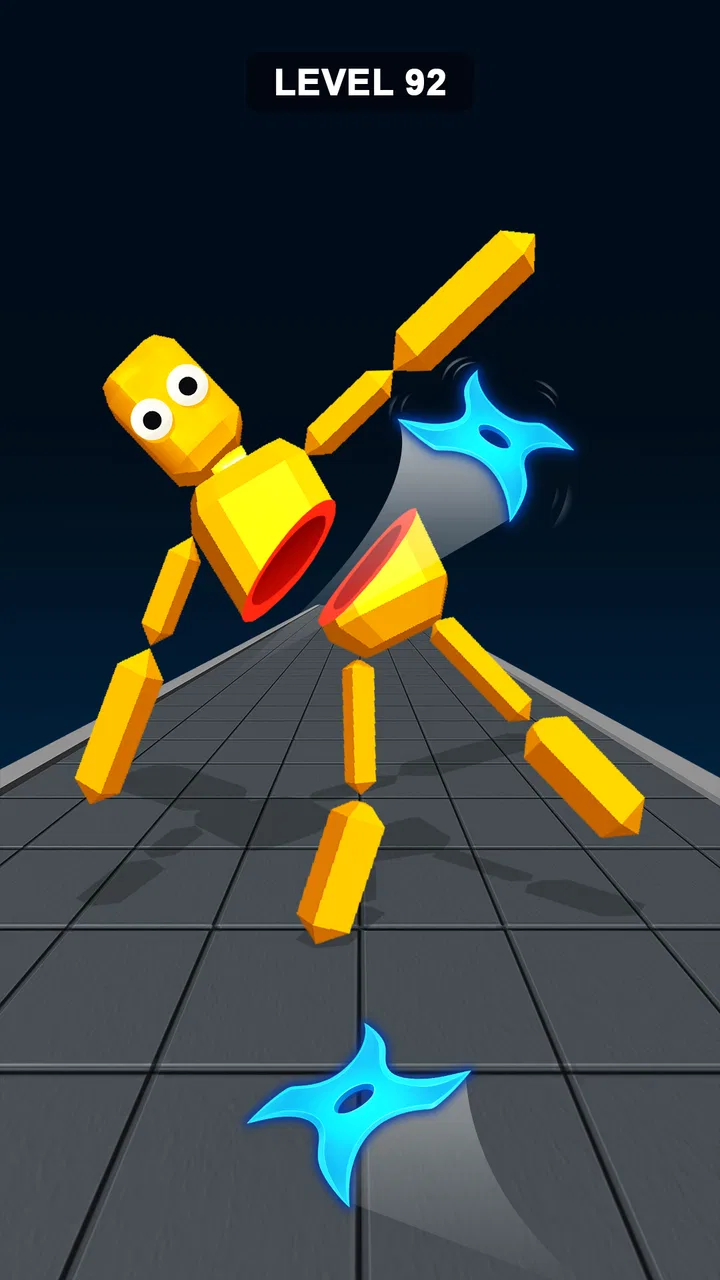
Ninja Shuriken: Throw & Slice is the kind of arcade game I open when I want a quick break rather than a long commitment. Its central idea is easy to understand: aim and throw shurikens, slice through targets, and enjoy the exaggerated movement of ragdoll-style action. The appeal comes from the immediate feedback. I do not need a long tutorial or a complicated control scheme before the first satisfying hit.
That simplicity is also the main reason to try it. This is a free game from Multi Robot Games, listed for Teen players, and it has built a sizable audience with over a million installs. Its average rating sits at 4.1 from around 3,600 ratings, which feels consistent with my impression: the basic action is enjoyable and approachable, but players who want deep progression or a highly competitive arcade system may eventually find it limited.
How the basic throwing and slicing loop feels
The normal workflow is refreshingly direct. I look at the scene, judge the target’s position, drag or aim in the direction that seems useful, and release to send the shuriken flying. The best moments come from lining up a throw that does more than simply hit one object. A well-judged slice can turn a short attempt into a small chain of satisfying reactions, especially when the ragdoll movement makes the result look more dramatic than the input itself.
You May Also Like

 Blood Strike: 2.5 Anniversary
Blood Strike’s Loadouts Turn Every Drop Into a Tactical Gamble
A close look at Blood Strike’s custom loadouts: how fast access to signature weapons reshapes its battle royale rhythm, rewards preparation, and narrows the gap between fights.

 Pandora - Music & Podcasts
Pandora’s Music Is Easy to Start, but Harder to Recover
Pandora’s strength is its low-effort path from a seed to a station. Its weak spot is how much confidence it asks you to place in connection, setup, and quiet recovery.

 8 Ball Pool
 Is Built on Rivalries, Rematches, and Routine
A close look at the rivalries, rematches, shared routines, and unanswered safety questions that turn a quick pool match into a persistent mobile community.

 Samsung Music
’s Quiet Strength Is Playing What You Already Own
Its reach comes less from spectacle than from dependable access to a personal library. That simplicity is both the app’s strongest retention engine and its ceiling.

 AccuWeather: Weather Radar
AccuWeather Review: A Quick, Clear Forecast for Everyday Decisions
For everyday plans, the best forecast is the one you can understand quickly. AccuWeather makes rain timing, radar, and local conditions easy to act on, with a few trade-offs.

 Hill Climb Racing
Why Hill Climb Racing Still Turns Crashes Into One More Run
A tiny car, a bumpy hill and one more upgrade: Hill Climb Racing keeps resurfacing because its simple chaos makes every near-miss feel personal.
More From Our News Desk



I found it helpful to treat each attempt as a short exercise in timing rather than as a frantic tapping game. Throwing immediately is tempting, but pausing for a moment often gives me a clearer view of the target and the likely path. That small habit matters because the game’s fun is not only in launching the weapon; it is in choosing an angle that makes the impact feel deliberate.
The game works particularly well in everyday situations where I have only a few minutes. I can play a little while waiting for food, during a commute break, or between other tasks without needing to remember a large map or a complicated set of objectives. The compact arcade format makes it easy to stop after an attempt and return later without feeling that I have abandoned a long session.
At the same time, I would not describe it as a substitute for a full action game. The experience is built around quick throws and visual reactions, not exploration, storytelling, or a large combat system. If you usually play arcade titles for leaderboards, elaborate upgrades, or a wide range of modes, this may feel more like a focused toy than a complete long-term hobby.
Why the ragdoll presentation changes the experience
The ragdoll style gives ordinary hits a playful quality. A successful slice is not presented as a dry score event; the movement afterward helps sell the impact. That makes repeated attempts less sterile than a basic target-shooting game, because the result can look slightly different depending on where the shuriken lands and how the character reacts.
There is a useful distinction here between visual variety and mechanical depth. The reactions keep the moment-to-moment action lively, but they do not automatically create a deep strategy layer. I still make most decisions around angle, timing, and target priority. Players should enjoy the animation as part of the reward rather than expecting every ragdoll reaction to open a new tactical system.
My most reliable starting habit is to identify the easiest clean hit first. When a scene looks busy, I resist trying to solve everything with one ambitious throw. A controlled opening attempt gives me a better sense of spacing and leaves less room for an accidental miss. Once I understand the layout, I can take more creative shots instead of wasting attempts on guesses.
Settings and practical checks before playing seriously
Before settling into longer sessions, I recommend checking the available in-game settings rather than assuming the default arrangement is ideal. The most important practical question is control comfort. A throwing game depends heavily on how naturally the aiming gesture responds, so I pay attention to whether my finger blocks the target, whether the gesture feels easy to repeat, and whether the visual presentation remains readable on my phone.
I also check sound and vibration options when they are available on my device or within the game. These effects can make a slice feel more impactful, but they are not always convenient in public places. Turning them down can make the game easier to use discreetly, while keeping some feedback enabled may help me recognize a successful action without staring at every detail.
Because the game is free, I also keep an eye on any purchase prompts during normal play. Individual in-app items are listed at $3.99 each, so I would not tap through a purchase screen casually. The sensible approach is to enjoy the basic loop first and decide whether any optional item genuinely improves the experience for the way I play. A free download is useful here, but it does not mean every extra is automatically necessary.
The current Android version is 1.26, and the stated minimum operating system is Android 7.0. That makes the compatibility requirement fairly approachable for many older devices, although the actual feel will still depend on screen responsiveness and general phone performance. I would give the game a short test session on an older handset before judging it from another person’s experience, because aiming comfort is more important here than raw graphical ambition.
One setting-related habit I find more valuable than constantly changing options is consistency. Once I find a comfortable control arrangement and audio level, I leave them alone for several sessions. Repeated throws become easier to judge when the visual and tactile feedback stays familiar. Constantly changing sensitivity, orientation, or effects—when those choices are offered—can make a missed throw seem like a settings problem when it is really a timing problem.
Faster patterns that improve ordinary attempts
Experienced play is less about throwing as fast as possible and more about reducing wasted movement. I try to begin each attempt with a quick scan: which target is closest, which one is moving or exposed, and which angle gives me the clearest path? This takes only a moment, but it prevents the common mistake of aiming at the most dramatic target simply because it attracts attention.
A second useful pattern is to separate setup throws from scoring throws. If the first target is easy, I use it to establish the rhythm of the scene. After that, I look for a more ambitious line. This approach is especially helpful when the ragdoll movement makes the result visually busy. Instead of reacting to every movement, I make one clear decision at a time.
When I miss, I do not immediately repeat the same gesture with more force. I ask what actually went wrong: was the starting point too close to the target, did I release at the wrong angle, or did I misread the target’s position? Repeating a flawed motion quickly only builds frustration. A small adjustment to the release direction is usually more useful than a dramatic change in speed.
For short sessions, I use a simple three-attempt routine. The first attempt is for reading the scene, the second is for correcting the main error, and the third is for trying a cleaner or more ambitious throw. This gives a casual session a sense of purpose without turning a relaxing arcade game into homework. It also helps me decide whether a difficult moment is genuinely enjoyable or simply repetitive.
Another practical tip is to avoid playing with a cluttered grip. If my finger covers the path or I hold the phone at an awkward angle, I make poorer judgments before the game has done anything wrong. A stable one-handed position works for quick play, while a two-handed grip can give better control when I want to study a difficult setup. The best choice depends on the size of the device and how much precision the scene demands.
Where the game rewards patience rather than speed
The relaxing side of the game becomes clearer when I stop treating every throw as a race. The store summary presents it as a calming slicing experience, and I understand that description when I focus on clean movement and satisfying contact instead of chasing constant action. A slow, accurate throw can feel better than several rushed attempts, particularly when I am using the game to unwind.
That does not mean the game is always calm. The action and ragdoll presentation can become visually energetic, and a missed throw can interrupt the flow. Still, the controls are simple enough that I can return to a relaxed rhythm quickly. For me, the best use is a short sequence of focused attempts rather than an extended session where I expect the game to keep introducing major surprises.
This makes it a good fit for players who enjoy casual physics-flavored arcade games and want an uncomplicated interaction. It is less suitable for someone who needs a strong narrative reason to continue, a large collection of characters, or a detailed competitive structure. Those players may be happier with a more substantial action title or a puzzle game that builds complexity over time.
Limits that become clearer after repeated play
The main limitation is the narrowness of the central loop. Throwing and slicing can be satisfying, but the same basic action remains the heart of the experience. If the visual novelty stops being enough for you, there may not be a deeper system waiting to replace it. I would therefore approach this as a focused arcade diversion, not as a game guaranteed to hold my attention for months.
The balance between relaxation and precision can also be uneven from a player’s perspective. When a throw feels clean, the game is rewarding. When the result seems less predictable than expected, the simplicity of the controls leaves me with fewer ways to respond. There are no complicated tools to manage a difficult situation; I mainly need to improve my reading of the angle and timing.
The Teen content rating is worth considering for families choosing games for younger players. The simple controls may look child-friendly, but the listed age guidance should still be respected. I would also remember that optional purchases can appear in a free game, so parents may want to review device purchase controls before handing over the phone.
Another trade-off is that the game’s accessibility depends strongly on touch comfort. Players with a responsive screen and enough space to aim will likely find the interaction natural. On a small or older device, the same gesture may feel cramped. This is one reason I would not judge the game solely by its rating. A 4.1 average suggests generally positive reception, but personal control comfort will decide whether the experience feels smooth.
I also think about what the game is competing with. Compared with a traditional endless runner, it asks for more deliberate aiming and less continuous movement. Compared with a physics puzzle, it offers faster feedback and less planning. Compared with a full ninja action game, it is much lighter and more focused. That middle position is its strength for casual players, but its weakness for anyone looking for a broad feature set.
Who should download it, and who should skip it
I would recommend it to someone who wants a free arcade game that can be understood immediately and played in short bursts. It is especially appealing if you like tactile gestures, exaggerated physics, and the small satisfaction of improving a throw after a miss. The developer, Multi Robot Games, has kept the concept easy to approach, which is useful when I want entertainment without a long onboarding process.
I would skip it if I need a campaign with meaningful story progression or if I quickly lose interest in repeating one central mechanic. I would also choose another game if my priority is serious competition, deep customization, or a large set of distinct play styles. The free entry point makes trying it easy, but the decision to keep playing should come from enjoying the slicing loop itself rather than expecting a very different game to appear later.
For a normal daily scenario, I can see myself opening it after a tiring workday, playing a handful of attempts with the sound lowered, and stopping once the aiming rhythm starts to feel repetitive. That is not a criticism of the short format; it is the right expectation. The game works best when I let it be a compact reset rather than demanding the depth of a console-sized action experience.
My verdict after settling into the routine
Ninja Shuriken: Throw & Slice succeeds because it makes the first interaction clear and gives each accurate throw a lively visual payoff. My preferred routine is simple: check the controls, keep the feedback comfortable, scan the scene before releasing, and use misses to adjust one part of the gesture instead of rushing into another attempt. Those habits make the game feel more controlled and more relaxing.
Its limits are equally clear. The core activity can become repetitive, the experience is not aimed at players seeking a deep progression system, and optional items priced at $3.99 each deserve a deliberate decision rather than an impulsive purchase. I would treat it as a free arcade diversion with a pleasant ragdoll twist, not as an all-purpose action game.
Overall, I think it is worth trying if you enjoy quick, gesture-based challenges and want something that delivers a small burst of action without demanding a long session. The strongest reason to keep it installed is the satisfying combination of aiming, impact, and playful movement. If you enjoy improving a simple physical action through repeatable habits, this is where the game has its best chance of becoming a regular break-time favorite.
FAQs for Ninja Shuriken: Throw & Slice
01What is Ninja Shuriken: Throw & Slice?
Ninja Shuriken: Throw & Slice is an action-focused mobile game built around throwing shuriken and slicing targets with precision. Its gameplay is designed for short, fast sessions, combining timing, aiming, and reflexes. As you progress, stages generally become more demanding, requiring better accuracy and quicker reactions rather than simply tapping as fast as possible.
02How do you play Ninja Shuriken: Throw & Slice?
The main controls are easy to understand: aim your attack, release the shuriken or slicing action, and try to hit the correct targets while avoiding obstacles or mistakes. The early levels work as a gentle introduction, but later challenges can require careful timing and a more strategic approach. Players who rush their throws may lose opportunities or fail objectives.
03Is Ninja Shuriken: Throw & Slice free to download and play?
The game can generally be downloaded without an upfront purchase, allowing users to try its core gameplay before spending money. However, free mobile games may include advertising, optional in-app purchases, or both. These purchases can sometimes provide cosmetic items, extra attempts, upgrades, or other conveniences. Check the store listing on your Android or iOS device for the current pricing and purchase details.
04Does Ninja Shuriken: Throw & Slice require an internet connection?
Whether an internet connection is needed can depend on the version of the game and the feature being used. Basic levels may work offline after installation, while advertisements, rewards, cloud features, updates, or purchases may require connectivity. If you plan to play while traveling or without mobile data, test the game in airplane mode first, since offline availability can change with updates.
05Is Ninja Shuriken: Throw & Slice suitable for children and casual players?
The simple controls and quick levels make Ninja Shuriken: Throw & Slice accessible to casual players, including people who prefer short gaming sessions. Its ninja-themed action is presented in an arcade style rather than as a realistic combat simulation. Parents should still review the age rating, advertising, privacy information, and in-app purchase settings before allowing younger children to download and play.
Pros
- Simple swipe controls make throwing shurikens easy to learn.
- Short levels are convenient for quick gaming sessions.
- Satisfying slicing effects make successful throws feel rewarding.
- Progressive challenges help keep the gameplay engaging.
- Works well for casual players who prefer straightforward mechanics.
Cons
- Gameplay may become repetitive after extended play.
- Precision can feel inconsistent on smaller phone screens.
- Frequent ads may interrupt the flow between levels.
- Limited variety may reduce long-term replay value.
- Some upgrades or content may require in-app purchases.

Ninja Shuriken: Throw & Slice
Gallery